- Tailored to Your Business Needs
Unlike generic project management tools, a custom solution allows you to include features that are essential for your business. Whether it’s specialized task tracking, advanced reporting, or integration with other tools, custom software gives you flexibility to match the software to your business’s unique requirements. - Improved Collaboration and Communication
Custom project management software enables better communication between project teams and stakeholders. With built-in collaboration features like file sharing, task assignment, and real-time updates, everyone stays on the same page throughout the project. - Increased Efficiency
By automating workflows, setting custom alerts, and providing a central hub for project details, custom software helps eliminate manual processes and improve overall productivity. Teams can access relevant information quickly, leading to faster decision-making and fewer errors. - Better Project Tracking and Reporting
Custom software can be designed to offer detailed tracking and reporting features that align with the way you run your projects. From financial tracking to performance dashboards, it ensures you can easily measure progress and make data-driven decisions. - Scalability
As your business grows, your project management needs evolve. Custom project management software is built to scale alongside your business, meaning you can add new features, users, and capabilities as required without disrupting your workflow.
Key Features of Custom Project Management Software
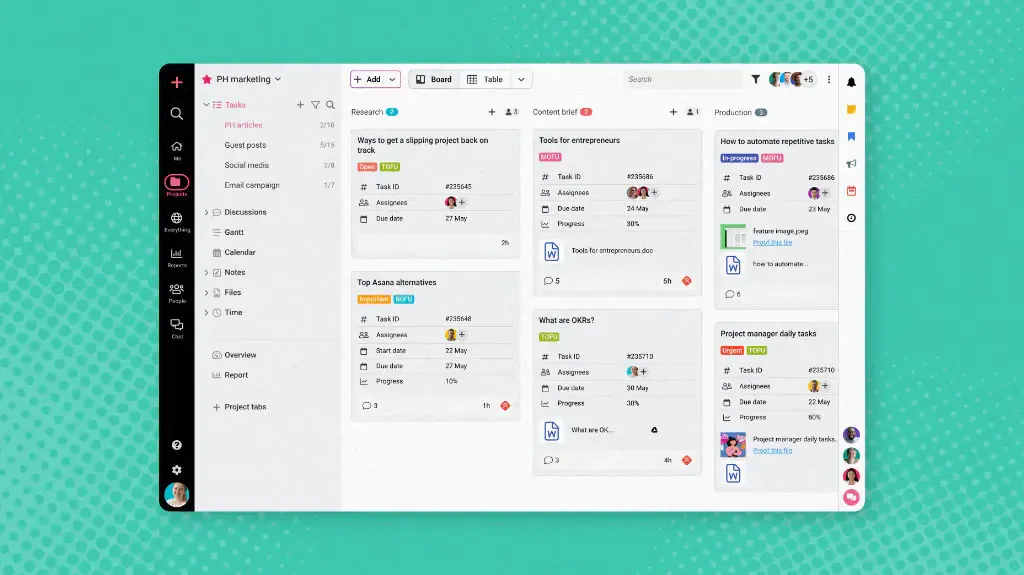
Task Management and Assignment
Create, assign, and track tasks with clear deadlines.
Visualize task progress and dependencies to prevent bottlenecks.
Set priority levels for tasks to focus on what matters most.
Project Scheduling and Time Tracking
Build project timelines with Gantt charts or Kanban boards.
Track project milestones, timelines, and progress in real-time.
Monitor team member hours and billable time for better resource management.
Collaboration Tools
Enable team members to share files, comment on tasks, and communicate directly within the platform.
Real-time notifications keep everyone updated on changes, tasks, and deadlines.
Manage shared calendars to coordinate schedules across teams.
Resource Management
Track and manage resources like employees, equipment, and budgets.
Allocate resources efficiently based on project needs and availability.
Prevent resource overloads by balancing workloads and deadlines.
Customizable Dashboards
Create personalized dashboards that display only the information you need.
Visualize KPIs, timelines, tasks, and milestones in an easy-to-understand format.
Use real-time data to measure project progress and make informed decisions.
Document Management and File Sharing
Store and organize important project documents in one secure location.
Share files between team members and stakeholders directly within the software.
Keep track of document versions to prevent confusion.
Budgeting and Financial Tracking
Track project expenses, resources, and costs in real time.
Set and manage project budgets, and monitor if they’re on track.
Generate financial reports to ensure project profitability.
Risk Management
Identify and assess risks associated with the project early on.
Track potential issues and implement mitigation strategies in a timely manner.
Ensure that your projects are protected from unexpected disruptions.
Client and Stakeholder Access
Provide clients and stakeholders with limited access to project details, allowing them to track progress, view reports, and give feedback.
Customize access permissions based on roles to maintain data security.
https://www.google.com/search?sca_esv=69ce569418db93e5&sxsrf=AE3TifMkCXbOLbwlGoZ_Edu6OVRtm7CbNw:1765798803698&q=Custom+Project+Management+Software&source=lnms&fbs=AIIjpHz30rPMyW-0vSP0k1VTNmO_kCOARpjPjQRkBWH2HwUIz5XUSIJvSK0oms7XOxizDlmwKHITlKtWk2mI7HrsvZYSQxyFnvPOXD8EL85KLH3X6wLsMidVuBTm89nF3q4V-XsNQlSjeB8hAyS9nnWaj60m8VaZwUer0ybbXkFMt3yIw5_0dDZIvMmq7DWUi9DCLgG-FkA9xx89gRUMAZdf3GC3higHgV2AtyC20W32wBTpytyiAyI&sa=X&ved=2ahUKEwiLyMGTwb-RAxVHUGcHHVnMDXgQ0pQJegQIDRAB&biw=1920&bih=953&dpr=1